Lights as navigation
During a daytime visual approach, pilots navigate using terrain features, building outlines, coastlines, and the runway itself. At night, almost all of that disappears. What remains is the lighting system — and pilots are trained to read it like an instrument. The approach lights tell you where the runway starts. The PAPI tells you whether you're on glidepath. The edge lights define the runway boundaries. The taxiway centerline lights guide you to the gate.
If any of these lighting elements are missing, mispositioned, or the wrong color, the pilot's visual reference breaks. In the real world, that's a safety issue. In a simulator, it's a training accuracy issue. And in a consumer flight sim, it's the difference between an airport that feels alive at night and one that feels like a flat texture with some dots on it.
The anatomy of an approach lighting system
Approach lighting systems are some of the most complex infrastructure at any airport, and among the most important for simulator accuracy. A full ALSF-II system — the type installed at major IFR airports — consists of a sequenced array of lights extending up to 3,000 feet before the threshold, with crossbar markers at specific intervals and sequenced flashers that create the visual impression of a ball of light rolling toward the runway.
Each component has a defined position, intensity, and color specified in ICAO and FAA documentation. The spacing between bars, the lateral spread of the crossbars, and the transition from white approach lights to green threshold lights all follow precise standards. In a simulator, replicating this system accurately means a pilot can practice identifying the approach lights in low visibility and transitioning to the runway visual segment exactly as they would in the real aircraft.
Getting approach lights wrong isn't just a cosmetic issue. A pilot practicing a Category II approach in the simulator needs to see the approach lighting system resolve out of the fog at the correct distance and in the correct pattern. If the lights appear too early, the pilot learns the wrong decision height cues. If the pattern is wrong, the pilot's scan doesn't transfer to the real cockpit.
What gets modeled — and what gets skipped
Most flight simulation airports include some form of runway lighting. Edge lights, threshold lights, and a basic approach light configuration are standard. But the details that separate a functional airport from a training-grade one are often missing.
| Lighting element | Function | Common sim issues |
|---|---|---|
| PAPI / VASI | Visual glidepath indication (red/white transition) | Incorrect angle, wrong positioning relative to threshold, missing intensity variation |
| Approach lights (ALS) | Runway identification and alignment in low visibility | Simplified patterns, missing crossbars, incorrect sequencing |
| Runway edge lights | Define runway boundaries, change from white to yellow in last 2,000 ft | Uniform white throughout, no intensity settings |
| Taxiway centerline | Guidance from runway to gate, alternating green/yellow at hold positions | Missing entirely or generic green throughout |
| REILs | Runway end identifier lights — synchronized flashing | Often omitted at smaller airports |
| Apron flood lights | Illuminate parking positions and terminal areas | Missing or replaced with ambient glow |
Color, intensity, and directionality
Getting the right number of lights in the right places is only part of the challenge. Real airport lights have specific optical properties that affect how they appear from a moving aircraft. Runway edge lights, for example, are directional — they're designed to be visible within a specific arc from the approach direction. From the side, they're dimmer. From behind, they may be invisible. This directionality is part of how pilots distinguish the active runway from parallel taxiways at night.
Intensity matters too. Real airport lighting systems operate at multiple intensity steps, typically five, controlled by ATC based on visibility conditions. At maximum intensity during low visibility operations, the lights are bright enough to be visible through fog. At minimum intensity on a clear night, they're subdued to avoid blinding pilots on short final. Modeling this intensity range in a simulator adds another layer of realism that directly supports training value.
Color transitions are equally specific. Runway edge lights are white for most of the runway length but transition to yellow in the last 2,000 feet before the departure end, giving the pilot a visual cue of remaining distance. Taxiway centerline lights change from green to alternating green and yellow approaching a runway hold position. These are navigation cues, not aesthetic choices, and they need to be correct.
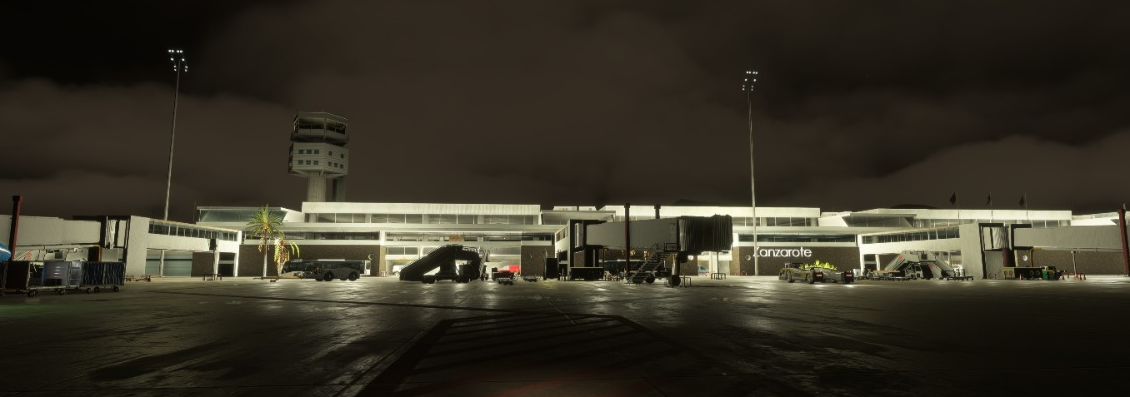
GCRR Lanzarote at night — runway edge lights, approach lights, and apron illumination
The PAPI problem
Precision Approach Path Indicators are among the most training-critical lights at any airport. A PAPI consists of four light units that each show either red or white depending on the aircraft's angle of approach. Two red, two white means on glidepath. Three or four white means too high. Three or four red means too low. Pilots use this system constantly during visual approaches, and the transition between colors happens at precisely defined angles.
In simulation, a correctly modeled PAPI requires accurate placement relative to the threshold, correct glidepath angle programming (typically 3° but it varies by runway), and proper light spread characteristics. A PAPI that's 50 meters from its real-world position or set to the wrong angle gives pilots incorrect glidepath feedback. They train on the wrong picture and carry that into real operations.
We validate PAPI angles against published approach data for every runway we model. The light units are positioned according to the airport's AIP documentation, and the color transition angles are calibrated to match the published glidepath. It's a small detail in the overall model, but it's one that pilots use on every single visual approach.
Ambient glow and light pollution
Airport lighting doesn't exist in isolation. A real airport at night sits within a broader lighting environment — the glow of nearby cities, highway lights, industrial areas, and the airport's own terminal and apron illumination creating a dome of light visible from miles away. This ambient environment is part of how pilots identify airports at night during the visual segment of flight.
The orange-yellow sodium glow of a city, the colder white of modern LED infrastructure, the distinctive pattern of highway lighting leading toward the airport — these are real visual references that experienced night pilots use. In simulation, this ambient environment is often the weakest link. The airport itself might be well-lit, but if the surrounding area is a black void, the visual approach doesn't feel or work the way it does in reality.
Approach lighting
ALSF-II / MALSR systems modeled to ICAO specifications — correct bar spacing, crossbar widths, and sequenced flashers.
PAPI calibration
Light units positioned per AIP documentation with glidepath angles validated against published approach plates.
Taxiway guidance
Centerline lights with correct green-to-yellow transitions at hold positions, matching real-world ground navigation.
Ambient environment
City glow, highway patterns, and terminal illumination that match the real night visual environment around the airport.
What we deliver
Every airport we build goes through a lighting audit based on the airport's published documentation. We reference the AIP, the aerodrome chart, and available survey data to place each lighting element at its documented position. Approach lighting systems are built to the installed type with correct geometry. PAPIs are calibrated to published glidepath angles. Edge lights include the white-to-yellow transition. Taxiway guidance includes hold position markings.
For professional training clients, we can model specific intensity settings and integrate lighting state changes into scenario design — simulating a step-down from intensity 5 to intensity 3 as weather improves, or modeling a failed approach light bar to practice degraded operations. These details add training value that goes beyond visual fidelity into procedural accuracy.
For consumer simulation products, the same lighting data is present but optimized for performance. The visual result is an airport that looks correct at night — the right lights, in the right places, showing the right colors — while maintaining the frame rates that consumer hardware demands.